Gold Medal
For Universities & Schools

Immersive Gen AI Solution for Soft Skill Training & Placement

This platform will allow students to train on the skills and confidence they need to succeed in placements, internships, interviews, and the corporate world—using the power of Artificial Intelligence and Immersive Technology.

Explore the Immersive Gen AI Training Solution Today

Thank you! Your submission has been received!
Oops! Something went wrong while submitting the form.

Why Use Immersive Gen AI Solution for Training?

This platform offers an immersive learning experience, where Generative AI powers training and Virtual/Mixed Reality ensures unmatched engagement.

Students get to:
Tick Box
Practice mock interview anytime in an Immersive environment.
Tick Box
Enhance communication, body language, and self-confidence.
Tick Box
Achieve up to 80% retention with immersive learning.
Tick Box
Learn at their own pace, from any location.
Tick Box
Enjoy a fun, interactive, and engaging experience.
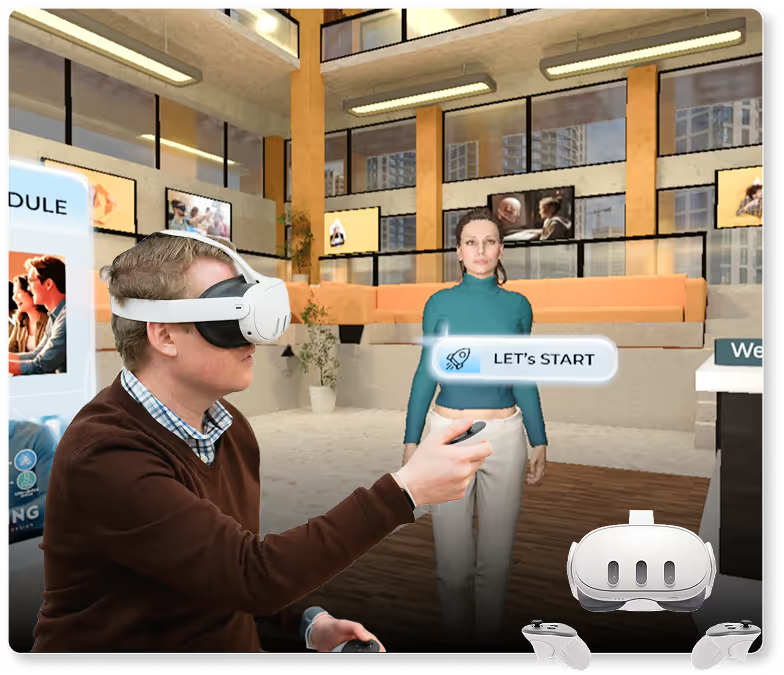
Man wearing virtual reality headset holding controllers interacting in a virtual environment with a female avatar and a 'LET'S START' prompt in a modern open space.

How it can be accessed?

White virtual reality headset with two matching white controllers on each side.

Virtual Reality

Learners can Practice in a Virtual Reality Environment on device like Oculus Quest 2
White virtual reality headset with two white and black handheld controllers floating on each side.

Mixed Reality

Some of the practice modules can be accessed in Mixed Reality format on devices like Oculus Quest 3
Silver laptop with a minimalistic landscape wallpaper showing sand dunes and a calm body of water.

WEB Access

Learners can also access the Content on the online Platform as well. Where AI Avatar appers on WEB.

User Journey for the Solution

Illustration of a woman using a laptop and another woman wearing a VR headset interacting with virtual content.

Step 1

Learners can access the program via their laptop or Oculus Quest 2/3 device.
Person wearing virtual reality headset interacting with a floating login screen showing username and password fields.

Step 2

They log in using email and password credentials provided by University
Virtual reality interface displaying six video thumbnails labeled: Meeting Room, Conference Room, Watch Speaking Tips, Interview Training, and others, in a modern industrial space.

Step 3

After logging in, learners enter a virtual environment showcasing all available modules like Creative Problem Solving, Team Building, and Customer Interaction.
Virtual meeting room with a man in a blue checked shirt seated at a table, facing a screen displaying various roleplay type options such as Free-Flowing Conversation, Sales Pitching, Interview, and Customer Service.

Step 4

On selecting a module, they are placed in a virtual classroom with an AI avatar, a blackboard, and relevant video/image assets
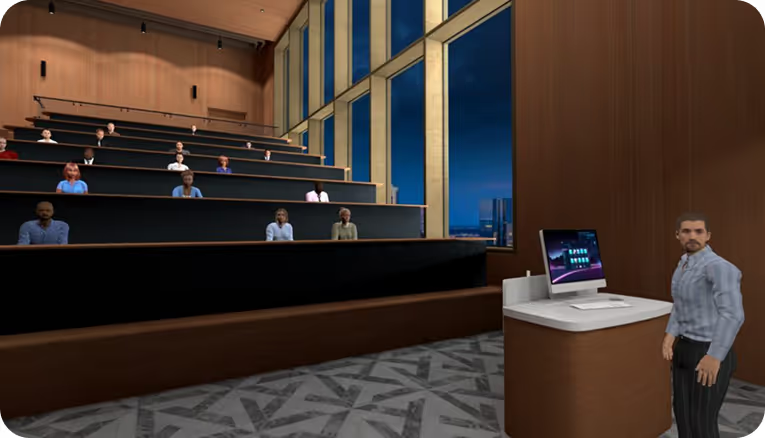
Teacher standing near a podium with a computer in a modern lecture hall with students seated in tiered rows and large windows showing a cityscape at dusk.

Step 5

The AI avatar introduces the program in 30 seconds, followed by an interactive training session.Learners engage in a real-time discussion with the avatar on the chosen topic.
Virtual reality interface showing speech feedback including filler words count, eye contact score 8 out of 10, and speaking pace of 141 words per minute, with people seated around a conference table.

Step 6

At the end, learners receive detailed AI-generated feedback covering engagement, communication, body language, and improvement points.

How it Elevates your Competence

Checkmark
Proprietary, One-of-a-Kind Platform:

Positions Yourself as an Education Innovation Leader —redefining how modern Learning & Training is done in Universities & Schools.
Checkmark
Built on Existing Course Data:

We use your current training content to build modules and AI conversations—no need to start from scratch.
Checkmark
Trainer-Free Execution:

Say goodbye to scheduling conflicts and trainer unavailability. With AI avatars, training is always available, always consistent.
Checkmark
Scalable, On-Demand Access:

Employees can train any time, from any location—across shifts, departments, and regions.
Woman in traditional Indian saree using virtual reality headset and controllers in an office setting.

Why it works for Universities

Woman wearing a VR headset and holding a VR controller indoors with another person using a VR headset in the background.
Checkmark
Prepares Students for Real Placements:

Practice interviews, GDs, and presentations just like real life.
Checkmark
No Need for External Trainers:

AI handles training 24/7, saving time and money
Checkmark
Tracks Every Student’s Progress:

Get performance reports and insights for each learner..
Checkmark
Fun & Interactive Learning:

Students enjoy learning with avatars, virtual rooms, and instant feedback.
Checkmark
Works on Any Device:

Students can train from a laptop, VR headset, or MR glasses anytime
Oculus Rift

XR Mentors

Customizable Platform Modules

Audience sitting in rows of chairs inside a large, decorated hall with star-shaped lights hanging from the ceiling, viewed from behind a virtual interface with buttons for presentation controls.

Public Speaking

Helps students overcome stage fear and speak clearly in front of an audience.
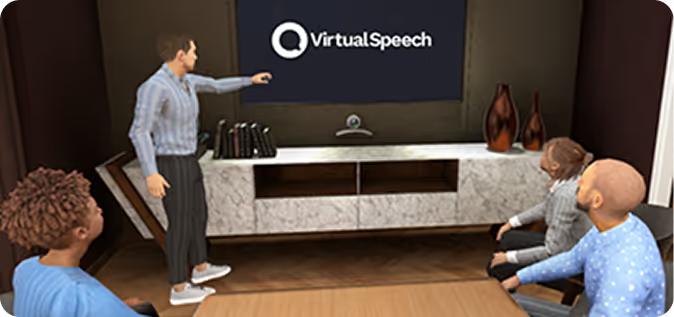
Virtual meeting room with four animated avatars, one standing and pointing at a screen displaying 'VirtualSpeech'.

Project/Thesis Presentation

Helps students practice presenting their final-year project with clarity and confidence.
Group of seven young adults sitting around a large table with laptops in a modern conference room discussing work, with a screen in the background.

Group Discussion Practice

Simulates GD rounds to improve speaking, listening, and argument skills.
Rendered image of a man and woman in business attire conversing in a modern office corridor.

Resume Pitch & Elevator Talk

Students learn how to confidently present their resume in 30-60 seconds.
Person seated at a podcasting or recording studio desk with a laptop, microphone, headphones, notebooks, and water bottle.

Technical Interview Simulation

Branch-specific technical questions to help students prepare for company interviews.
Business team seated around a large conference table with laptops, facing forward during a meeting.

Conflict Resolution & Teamwork

Teaches how to handle disagreements, work in teams, and communicate calmly under pressure.
Man with beard and mustache wearing a blue striped shirt sitting at a wooden table in a modern office with city buildings visible through large windows.

Mock HR Interview

Students practice common HR interview questions with an AI avatar in a realistic setting.
Office scene with a man handing a note to a seated woman in a cubicle while another woman stands nearby.

Workplace Communication

Prepares students for real-world office behavior, email writing, and team interaction.

Multiple Avatars

Diverse group of eight people standing side by side with varied hairstyles, skin tones, and casual to business casual clothing.
Three diverse women standing confidently against a dark background wearing stylish business and casual outfits.

AI Avatars – Your Students’ Personal Trainers

Checkmark
Mentor/ Career Coach– For Soft Skill Training
Checkmark
Communication Coach – For presentation and pitch evaluations
Checkmark
HR Manager – For mock interviews and etiquette
Checkmark
Technical Interviewer – Role-based for each department
Checkmark
Peer Student – For group discussions and teamwork practice
Checkmark
Placement Officer – For resume pitching and confidence building

Multiple Environment

Modern office space with a long wooden workstation, office chairs, indoor plants, gray carpet, and large windows.Modern office space with a black ergonomic chair in front of a desk holding an open laptop, coffee cup, and mouse, with a round table and chairs near large windows in the background.

Environment Delivery

Checkmark
College Seminar Stage – Ideal for public speaking and project presentations
Checkmark
Group Discussion Hall – Practice GDs with peers and avatars
Checkmark
Interview Room – Simulate one-on-one HR and technical interviews
Checkmark
Startup Pitch Zone – Present ideas and business plans confidently
Checkmark
Corporate Office Setup – Learn professional communication in a business setting
Checkmark
Virtual Lobby – A branded entry space to explore all modules easily
Modern office interior with gray booth seating on the left and yellow and black office chairs at desks on the right under white ceiling lights.
mecversity

Vs

Traditional
Learning

Traditional Learning

Document
Passive content consumption
Denied
One-size-fits-all teaching
Cancel
Limited engagement & interactivity
Event Declined
Trainer availability constraints
Microsoft HoloLens
Delayed or subjective feedback
Inquiry
Low knowledge retention
Inquiry
Not scalable across locations

Immersive Gen AI Learning

Checkmark
Active, experiential learning
Checkmark
Personalized AI-driven sessions
Checkmark
High engagement via VR/MR
Checkmark
24/7 access without trainers
Checkmark
Instant, unbiased feedback
Checkmark
Up to 80% retention rates
Checkmark
Easily scalable & on-demand

Faq's

What is AXR and how is it different from traditional soft skills training?
AXR is an AI-powered Mixed Reality training platform designed to simulate real-life workplace scenarios. Unlike traditional training methods, AXR provides immersive, interactive environments that help learners practice and improve communication, leadership, and presentation skills in a realistic setting.
Who can benefit from using AXR?
AXR is ideal for universities, colleges, corporate L&D departments, and HR teams looking to upskill students or employees in communication, leadership, negotiation, conflict resolution, and more.
How does AXR use AI in training?
AXR leverages AI to provide real-time feedback on speech clarity, confidence, eye contact, tone modulation, and body language. It analyzes user performance and generates actionable insights to improve soft skills progressively.
What kind of scenarios can users experience in AXR?
Users can experience scenarios like public speaking, job interviews, sales pitches, conflict resolution, leadership communication, team meetings, and client negotiations—all within a realistic MR environment.
Can AXR be customized for our institution or company?
Yes. AXR can be tailored to include custom training modules, industry-specific scenarios, branding elements, and assessment frameworks to align with your learning objectives.
Do users need to wear a Mixed Reality headset?
AXR is designed to work with both Mixed Reality headsets and standard PC-based systems. For the most immersive experience, a headset like the Meta Quest or HoloLens is recommended.
Is it suitable for remote or hybrid training models?
Absolutely. AXR supports remote access, allowing users to train from anywhere while still benefiting from immersive and interactive modules. It’s perfect for hybrid learning environments.
What kind of data and analytics does AXR provide?
AXR generates detailed reports on each user’s performance—including confidence scores, speech metrics, gesture analysis, and learning progression—helping trainers and HR teams track growth effectively.
How is AXR deployed and supported?
AXR is deployed via a plug-and-play model with onboarding support from Metaverse911. We also provide training for facilitators, regular updates, and technical assistance to ensure smooth usage.
How do we get started with AXR?
You can get started by booking a free demo through our website. Our team will walk you through the platform and discuss a tailored solution that suits your needs.
What is Mixed Reality, and how is it used in AXR?
Mixed Reality (MR) combines elements of both Augmented Reality (AR) and Virtual Reality (VR), allowing digital content to interact with the real world. In AXR, MR is used to create life-like environments where learners can engage with virtual avatars, simulated audiences, or meeting rooms, making training more immersive and effective.
How is Artificial Intelligence (AI) integrated into Mixed Reality training?
AI powers real-time feedback in AXR by analyzing speech, tone, gestures, and facial expressions during training sessions. It enables personalized guidance, instant scoring, and adaptive learning paths based on individual performance metrics.
What hardware or devices are required to use AXR?
AXR supports a range of devices, including Mixed Reality headsets like Meta Quest, HoloLens, and MR-ready PCs. For institutions without MR hardware, a PC or tablet version can also be used with slightly reduced immersion.
How secure is the data collected during training?
AXR ensures enterprise-grade data security. All user data, performance metrics, and session recordings are encrypted and stored securely, complying with global privacy standards such as GDPR.
Can AXR integrate with our existing LMS or HR systems?
Yes. AXR can be integrated with popular Learning Management Systems (LMS) and HR platforms, enabling seamless tracking, reporting, and user management across your training ecosystem.

Contact us

Get hands-on with Immersive GenAI at India’s First Metaverse Experience Center — explore the future of training and technology today!

Explore the Immersive Gen AI Training Solution Today

Thank you! Your submission has been received!
Oops! Something went wrong while submitting the form.
We are here to help you!! Contact us at: +91 84479 20977 or email at sales@metaverse911.in
Contact us: +91 84479 20977
Email us: sales@metaverse911.in